Everyone working with GA4 has come across bot traffic that has slipped through Google’s filters and straight into the reports in GA4.
Sometimes it’s just a few sessions here and there, but other times bots can generate a significant amount of traffic (and events), seriously skewing the metrics in your reports.
How to detect bot traffic in GA4?
Most of the time, the bot filter in GA4 does a very good job at filtering out unwanted traffic.
Read more about the bot filter built into GA4 here.
That being said, every once in a while, bots do slip through the built-in filter and can cause serious data quality issues, especially if they manage to go undetected.
So, how can we detect that bots are present in our GA4 property?
Below are a few dimensions which values you should check whenever guessing that your property may include bot traffic. For example, when detecting a sudden spike in traffic.
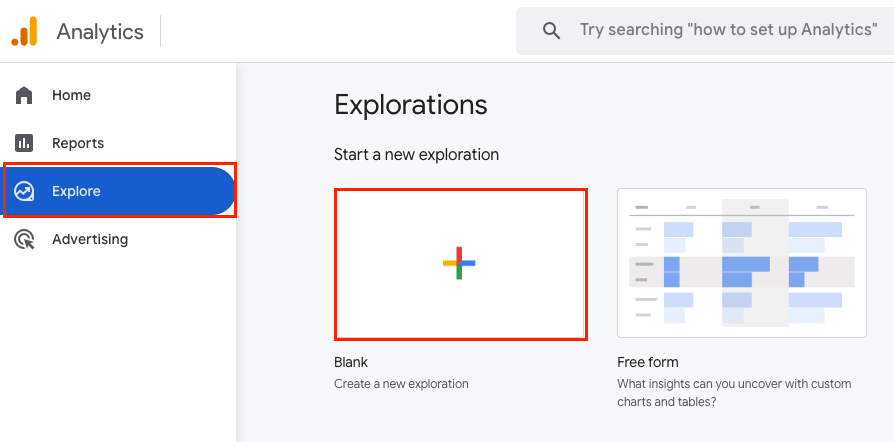
The best way to look into the dimensions below is to use the Explore feature in GA4, choose the affected date range and any other filters/segments to narrow the dataset down to what you believe to be affected.
Geolocation
One of the easiest ways to detect bot traffic in your GA4 property is to search for certain cities. Here’s a list of some of the most common cities notorious for generating lots of bot traffic.
In most cases, these are cities with massive data centres, but otherwise small populations.
- Ashburn, Virginia (USA)
- Flint Hill, Virginia (USA)
- Boardman, Oregon (USA)
- Columbus, Ohio (USA)
- Coffeyville, Kansas (USA)
- Dublin (Ireland)
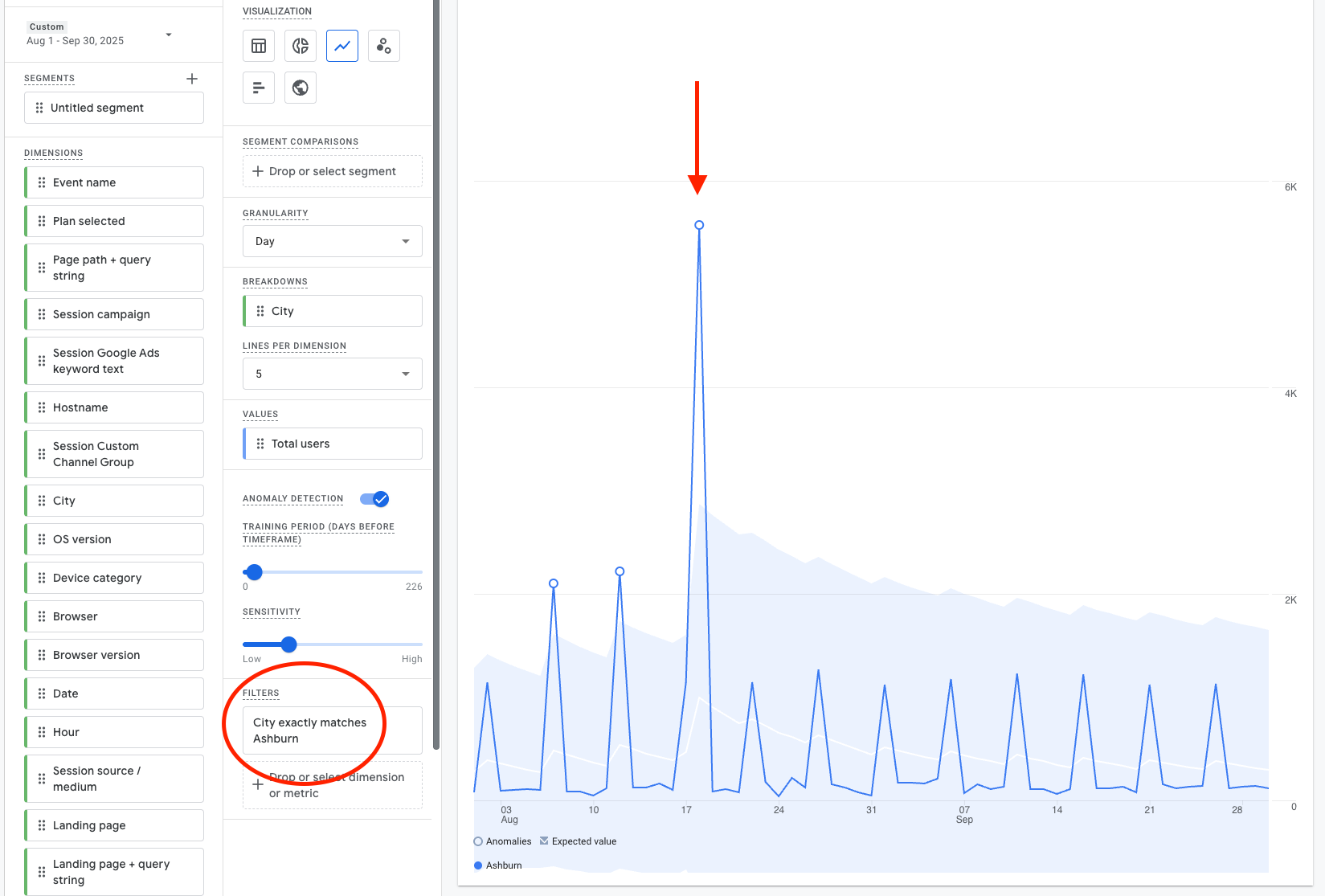
Should you notice sudden spikes in traffic from any of those (or any other suspicious) cities, it is highly likely that you’re dealing with bot traffic in your GA4 property and reports. Nevertheless, use at least one more method from below to be sure.
Device
While bots may use different devices, if you notice a sudden spike in just one specific device group, then there’s a good chance you’re dealing with bot traffic.
Start by checking device categories. Narrow it down to just one, say Mobile. Now look into device branding and operating systems.
Should there be a significant spike in a very specific device brand (i.e. Huawei on Android 13) and they’re all from one city, it’s 99% bot traffic.
Browser
Very similar to devices, bots often use a specific browser. Narrow it down to a specific browser brand and then look into browser versions. Combine with device and/or geo data, and you should have a pretty clear picture.
Operating System
Just like browser or device info, if there’s a sudden spike in a certain operating system, then this can indicate bot traffic. Start by narrowing down the high-level OS (iOS, Android, Windows, Linux) and then determine the specific version that’s behind the traffic spike. Combine with other dimensions, and you have a clear overview of the bot traffic affecting your GA4 reports.
Session Duration & Behavior
While bots are getting smarter, they’re not human. This means that most likely, they also behave differently from most users on your website.
In GA4, this is most visible in the session duration (usually extremely short), pages visited (often just one), events (commonly bots only trigger the automatically collected events like session_start, first_view and page_view but not ones that require real interaction like click or scroll).
Keep in mind, though, that while not very common, there can be bots that visit your site for several minutes and actually click and scroll around.
Traffic Source
More often than not, bots show in your GA4 as Direct traffic. Other times, they may show as (not set) or Unassigned, but they rarely come from any of the more meaningful sources like Organic or Social.
There is a certain type of bot that comes in from your paid ads, but that’s a story for another day.